Documentation
Get RedBSD up and running.
System Requirements
- 64-bit (amd64) CPU with virtualization extensions enabled
- At least 4 GB of RAM (8 GB recommended for running multiple tools/C2 frameworks)
- 20+ GB of disk space
- A hypervisor or bare-metal machine capable of running FreeBSD — RedBSD ships with VMware Tools pre-integrated for VMware-based labs
What's Included
RedBSD is built on top of FreeBSD — it uses the standard FreeBSD
base system, kernel, and package tools (pkg). What sets RedBSD apart is
everything layered on top: a ready-to-use desktop environment and a full red team /
penetration testing toolkit, organized by category and installed out of the box.
Desktop & Base Additions
A hardened FreeBSD base with an XFCE-derived desktop, SDDM login manager, VMware Tools integration, and a custom boot/UEFI splash — tuned for fast, reliable VM-based labs.
Tooling Categories
Beyond the desktop, RedBSD adds the following tool categories on top of the plain FreeBSD base. See the Features page for the full breakdown.
aircrack-ng, bettercap, kismet, reaver, wifite2
Sliver, Havoc, Mythic
GoPhish, evilginx2, SET
PEASS-ng, pspy, sudo_killer, LES, GTFOBins, checksec
chisel, ligolo-ng, proxychains-ng, sshuttle, rpivot
radare2, GDB + GEF, pwntools, ROPgadget, Ghidra
SecLists, rockyou, cupp, cewl, crunch
kubectl, trivy, pacu, ScoutSuite, cloudfox
CherryTree, Obsidian, pwndoc, pandoc
impacket, kerbrute, pypykatz, evil-winrm, adidnsdump, enum4linux-ng
recon-ng, sherlock, h8mail, phoneinfoga, SpiderFoot, theHarvester
Installed Software by Script
RedBSD is provisioned by a sequence of numbered setup scripts layered on top of a plain FreeBSD install. Expand a script below to see exactly what it installs or configures.
Configuration only — no additional packages installed.
Creates the default login user, redbsd, with the default password redbsd, and adds it to the wheel/operator/video groups for sudo and desktop access. Change this password after your first login. SSH access for this account is also enabled for remote deployment.
- Xorg — The X Window System display server that provides the graphical foundation for the desktop.
- D-Bus — Inter-process communication daemon used by desktop services and applications to talk to each other.
- Xfce — Lightweight desktop environment providing the windowing, panel, and session experience.
- Xfce4 Panel/Session/Settings/WM — Core Xfce components: the taskbar/panel, session manager, settings daemon, and window manager.
- Xfce4 Terminal — The default terminal emulator for the desktop.
- Xfce4 Appfinder — Application launcher and search utility for finding and starting installed programs.
- Xfce4 Notifyd — Desktop notification daemon that displays pop-up alerts from applications.
- Xfce4 Power Manager — Power, battery, and screen-blanking management applet.
- Thunar — The default graphical file manager.
- Thunar Archive Plugin — Adds 'create archive' / 'extract here' actions to Thunar's right-click menu.
- Firefox — The default graphical web browser.
- SDDM — Simple Desktop Display Manager — presents the graphical login screen and starts your desktop session.
- D-Bus — Inter-process communication daemon required by the login session and desktop services.
- Xorg — The X Window System display server used by the graphical login and desktop session.
- Xfce4 session/panel/WM/desktop/settings/terminal — Ensures a full Xfce session is available to launch immediately after logging in via SDDM.
- open-vm-tools — VMware Tools guest daemon, providing clipboard sharing, time sync, graceful shutdown, and shared folder support inside VMware.
- xf86-video-vmware — Xorg display driver for VMware's virtual SVGA adapter, enabling proper resolution and display performance.
Configuration only — no additional packages installed.
- Xorg — The X Window System display server that provides the graphical foundation for the desktop.
- Xfce — Lightweight desktop environment providing the windowing, panel, and session experience.
- Firefox ESR — Extended Support Release of Firefox, the default web browser.
- Thunar Archive Plugin — Adds 'create archive' / 'extract here' actions to Thunar's right-click menu.
- Engrampa — Graphical archive manager for browsing and extracting zip/tar/7z and similar archives.
- PulseAudio Volume Control — Graphical mixer for managing audio devices, applications, and volume levels.
- Xfce4 Screenshooter — Screenshot capture utility supporting full-screen, window, and region captures.
- VS Code — Visual Studio Code, a graphical source-code editor with extension support.
- bash — The Bourne Again Shell, a common Linux-compatible interactive shell and scripting language.
- zsh — The Z shell, a feature-rich interactive shell with advanced completion and theming.
- sudo — Allows permitted users to run commands as another user, typically root.
- doas — A small, simple privilege-escalation utility, often used as a lighter alternative to sudo.
- vim — A modal, keyboard-driven terminal text editor.
- nano — A simple, beginner-friendly terminal text editor.
- tmux — Terminal multiplexer for running and managing multiple terminal sessions/panes.
- screen — Terminal multiplexer and session manager, an alternative to tmux.
- tree — Displays the contents of a directory as an indented tree.
- lsof — Lists open files and the processes that have them open — useful for tracing sockets and handles.
- htop — Interactive, color terminal process and resource monitor.
- zip — Creates ZIP archives.
- unzip — Extracts ZIP archives.
- 7-Zip — High-ratio archive utility supporting 7z, zip, and many other formats.
- rsync — Efficient file synchronization and transfer tool, including over SSH.
- curl — Command-line tool for transferring data to or from a server over many protocols.
- wget — Command-line utility for retrieving files over HTTP, HTTPS, and FTP.
- Podman — Daemonless container engine for building and running OCI/Docker-compatible containers.
- podman-compose — Docker Compose-compatible multi-container orchestration for Podman.
- bind-tools — DNS lookup utilities such as dig, nslookup, and host.
- nmap — Network discovery and port-scanning tool used for host and service enumeration.
- socat — Versatile bidirectional data relay between sockets, files, pipes, and serial lines.
- tcpdump — Command-line packet capture and traffic analysis tool.
- whois — Queries domain and IP address registration information.
- Apache 2.4 — Widely used HTTP web server.
- nginx — High-performance web server, reverse proxy, and load balancer.
- lighttpd — Lightweight, low-resource-footprint HTTP server.
- PHP 8.3 — Server-side scripting language runtime used to serve dynamic web applications.
- Samba — SMB/CIFS file and print sharing for interoperability with Windows networks.
- Kerberos (krb5) — Network authentication protocol implementation, commonly used in Active Directory environments.
- OpenLDAP client — Command-line tools for querying and managing LDAP directories.
- FreeRDP3 — Remote Desktop Protocol (RDP) client for connecting to and controlling Windows hosts.
- Python 3 — General-purpose scripting language used by the majority of modern security tooling.
- pip / virtualenv — Python package manager and isolated virtual-environment tooling.
- Ruby — Scripting language used by a number of security and automation tools.
- Perl 5 — Scripting language used by many legacy and text-processing security scripts.
- Node.js / npm — JavaScript runtime and its package manager, used by many web-based tools and frameworks.
- Go — Compiled language used to build many modern security tools (e.g. NetExec, ligolo-ng).
- Rust — Memory-safe systems programming language used by some modern security tooling.
- OpenJDK 17 / 21 — Java runtime and development kits, required by Java-based tools such as Ghidra and BloodHound CE.
- Lua 5.4 — Lightweight embeddable scripting language.
- Maven — Build automation and dependency management for Java projects.
- Gradle — Build automation tool for Java and Kotlin projects.
- Apache Ant — Java build tool driven by XML build scripts.
- jq — Command-line JSON processor for filtering and transforming JSON data.
- xmlstarlet — Command-line toolkit for querying and transforming XML documents.
- SQLite3 — Embedded SQL database engine and command-line shell.
- DB Browser for SQLite — Graphical tool for viewing, querying, and editing SQLite databases.
- PostgreSQL client — Command-line client for connecting to and querying PostgreSQL databases.
- Redis — In-memory key-value data store, including its command-line client.
- yq — Command-line YAML processor, similar to jq but for YAML.
- MariaDB client — Command-line client for connecting to MySQL/MariaDB databases.
- ca_root_nss — Mozilla's curated root Certificate Authority bundle, used for TLS trust validation.
- GnuPG — OpenPGP implementation for file/message encryption, signing, and verification.
- OpenSSL — Cryptography toolkit and TLS library, including its command-line tool.
- Certbot — Automates obtaining and renewing TLS certificates from Let's Encrypt.
- GCC — The GNU Compiler Collection, for compiling C, C++, and other languages.
- binutils — Binary utilities such as objdump, readelf, nm, and strings for inspecting compiled binaries.
- GNU Make — Build automation tool driven by Makefiles.
- CMake — Cross-platform build-system generator used by many C/C++ projects.
- Ninja — Small, fast build system frequently used alongside CMake.
- pkgconf — Provides compiler/linker flags for installed libraries (pkg-config implementation).
- Autoconf / Automake / Libtool — GNU build-system toolchain for configuring and building portable source packages.
- LLVM — Compiler infrastructure providing the Clang compiler and related tooling.
- GDB — The GNU Debugger, for debugging compiled programs.
- Subversion — Centralized version control system client.
- Mercurial — Distributed version control system.
- MinGW-w64 — Cross-compiler toolchain for building Windows executables on FreeBSD.
- Zig — Systems programming language and toolchain, also usable as a C/C++ cross-compiler.
- Geany — Lightweight graphical IDE and text editor.
- Mousepad — Simple graphical text editor for Xfce.
- ripgrep — Fast, recursive, regex-aware text search tool (a grep replacement).
- open-vm-tools — VMware Tools guest daemon, providing clipboard sharing, time sync, graceful shutdown, and shared folder support inside VMware.
- xf86-video-vmware — Xorg display driver for VMware's virtual SVGA adapter, enabling proper resolution and display performance.
- Linux compat layer (RL9) — FreeBSD's Linux binary compatibility layer (RHEL9-based), allowing many Linux ELF binaries to run natively.
- RTFMv2 Community Edition — RedBSD's bundled engagement note-taking and tracking tool (community edition).
Configuration only — no additional packages installed.
Configuration only — no additional packages installed.
- ImageMagick — Image manipulation toolkit used to generate the RedBSD UEFI boot splash images.
Configuration only — no additional packages installed.
- aircrack-ng — Suite of tools for assessing Wi-Fi network security, including packet capture and WEP/WPA key cracking.
- nmap — Network discovery and port-scanning tool used for host and service enumeration.
- reaver — Brute-force attack tool targeting WPS PIN-enabled Wi-Fi access points.
- pixiewps — Offline WPS 'pixie dust' attack tool for recovering WPS PINs.
- kismet — Wireless network detector, sniffer, and intrusion detection system.
- bettercap — Network attack and monitoring framework for Wi-Fi, Bluetooth LE, and network MITM attacks.
- wifite2 — Automated wireless auditing tool that wraps aircrack-ng, reaver, and other Wi-Fi attack tools.
- Sliver (server & client) — Open-source, cross-platform adversary emulation and command-and-control (C2) framework.
- Havoc (notes) — Setup notes/links for Havoc, a modern post-exploitation C2 framework.
- Mythic (optional) — Setup notes/links for Mythic, a Dockerized multi-agent C2 platform (enabled via INCLUDE_MYTHIC).
- Covenant (notes) — Setup notes/links for Covenant, a .NET-based C2 framework.
- GoPhish — Open-source phishing simulation and campaign management framework.
- evilginx2 — Standalone man-in-the-middle phishing framework capable of bypassing 2FA.
- Social-Engineer Toolkit (SET) — Framework for executing social engineering attack vectors, including phishing and payload generation.
- PEASS-ng (linPEAS / winPEAS) — Privilege escalation enumeration scripts for Linux and Windows that highlight likely escalation vectors.
- pspy — Unprivileged Linux process monitoring tool, useful for spotting cron jobs and scheduled tasks run as other users.
- sudo_killer — Audits sudo configurations and the local environment for privilege escalation vectors.
- Linux Exploit Suggester — Suggests potential local kernel/privilege-escalation exploits based on the running kernel version.
- GTFOBins — Reference database of common Unix binaries that can be abused to bypass local security restrictions.
- checksec — Checks binaries and running processes for security hardening features such as NX, ASLR, RELRO, and PIE.
- proxychains-ng — Forces a program's TCP connections through one or more proxies (SOCKS/HTTP chains).
- chisel — Fast TCP/UDP tunnel over HTTP, useful for pivoting through firewalls.
- ligolo-ng — Tunneling and pivoting tool that creates a tun interface to route traffic into a target network.
- sshuttle — Transparent VPN-like proxy that tunnels traffic over an SSH connection.
- rpivot — Reverse SOCKS proxy for pivoting through restrictive outbound-only networks.
- socat — Versatile bidirectional data relay between sockets, files, pipes, and serial lines.
- redsocks — Transparently redirects TCP connections to a SOCKS or HTTP proxy.
- radare2 — Reverse engineering framework for disassembly, debugging, and binary analysis.
- rizin — Reverse engineering framework forked from radare2, focused on usability and stability.
- GDB + GEF — The GNU Debugger enhanced with GEF (GDB Enhanced Features) for exploit development.
- pwntools — Python library for rapid exploit development and CTF challenges.
- ROPgadget — Searches binaries for ROP gadgets used to build return-oriented-programming exploit chains.
- checksec — Checks binaries and running processes for security hardening features such as NX, ASLR, RELRO, and PIE.
- Ghidra — NSA-developed software reverse engineering suite with an interactive decompiler.
- SecLists — Large curated collection of wordlists for usernames, passwords, URLs, and fuzzing payloads.
- rockyou.txt — Classic leaked password list widely used as a baseline for password cracking.
- crunch — Generates custom wordlists from defined character sets and patterns.
- cupp — Common User Passwords Profiler — generates targeted password guesses from personal information about a target.
- cewl — Crawls websites to build custom wordlists from page content.
- hashcat — GPU/CPU-accelerated password hash cracking tool.
- John the Ripper — Password cracking tool supporting a wide range of hash and cipher formats.
- kubectl — Command-line tool for interacting with and managing Kubernetes clusters.
- trivy — Vulnerability and misconfiguration scanner for containers, filesystems, and infrastructure-as-code.
- AWS CLI — Command-line interface for managing and querying Amazon Web Services resources.
- pacu — AWS exploitation framework for offensive security testing of AWS environments.
- ScoutSuite — Multi-cloud security auditing tool that assesses AWS, Azure, and GCP configurations.
- Prowler — Security best-practice and compliance scanner for AWS, Azure, and GCP.
- Azure CLI — Command-line interface for managing and querying Microsoft Azure resources.
- cloudfox — Cloud reconnaissance tool that helps identify exploitable attack paths in cloud environments.
- Helm — Package manager for Kubernetes, used for templating and deploying applications.
- CherryTree — Hierarchical note-taking application, commonly used for engagement notes and evidence.
- pwndoc — Web-based penetration test report generation and management platform.
- pandoc — Universal document converter, e.g. Markdown to PDF, Word, or HTML.
- wkhtmltopdf — Renders HTML pages to PDF, useful for generating reports.
- impacket — Python library and toolset for crafting and manipulating network protocols such as SMB and Kerberos.
- kerbrute — Fast tool for Kerberos pre-authentication username enumeration and password spraying.
- pypykatz — Python implementation of Mimikatz for extracting credentials and secrets from memory/files.
- evil-winrm — Interactive WinRM shell for remote command execution against Windows hosts.
- adidnsdump — Dumps Active Directory-integrated DNS zone records via LDAP.
- enum4linux-ng — Enumerates SMB/Active Directory hosts for users, groups, shares, and password policies.
- NetExec — Network service exploitation and enumeration tool (successor to CrackMapExec).
- BloodHound (Python) — Python-based data collector for BloodHound, used to map Active Directory attack paths.
- recon-ng — Modular web reconnaissance framework for open-source intelligence gathering.
- Sherlock — Searches for the presence of a given username across many social media platforms.
- h8mail — Email OSINT and breach-data hunting tool.
- PhoneInfoga — Phone number information gathering and OSINT tool.
- SpiderFoot — Automated OSINT reconnaissance tool that aggregates data from a large number of sources.
- theHarvester — Gathers emails, subdomains, hosts, and employee names from public sources.
- Holehe — Checks whether an email address is registered on numerous websites.
- Photon — Fast web crawler designed for OSINT, extracting URLs, emails, and secrets from sites.
Configuration only — no additional packages installed.
Adds desktop entries/launchers for: Wireshark, Burp Suite, OWASP ZAP, Ghidra, CherryTree, Maltego, GoPhish, BloodHound CE, SpiderFoot, pwndoc, Sliver C2.
- llama.cpp (llama-server) — Lightweight C/C++ inference engine for running large language models locally, including an OpenAI-compatible API server.
- Qwen3-1.7B GGUF model — Small open-weight language model in GGUF format, used as a starter model for local inference.
- CMake — Cross-platform build-system generator used to build llama.cpp.
- Ninja — Small, fast build system used to build llama.cpp.
Installation
- Download the latest RedBSD build from the Download page.
- Verify the SHA256 checksum against the value listed on the Download page.
- For VMware: import the provided virtual machine image directly. For VirtualBox: import the OVA appliance. For ISO: attach it as the boot CD/DVD on a FreeBSD (64-bit) virtual machine or bare-metal install target.
- Boot the VM (or hardware) and follow the on-screen FreeBSD installer prompts if installing from ISO.
-
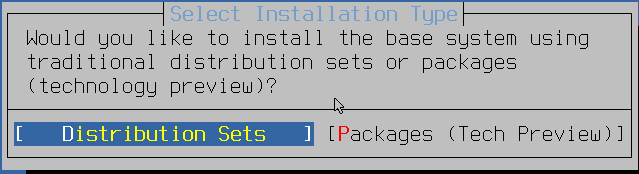
When prompted with "Select Installation Type", choose
Distribution Sets. Do not choose
"Packages (Tech Preview)" — RedBSD's first-boot provisioning agent is
delivered as a distribution set and will not be installed under the Packages option.
-
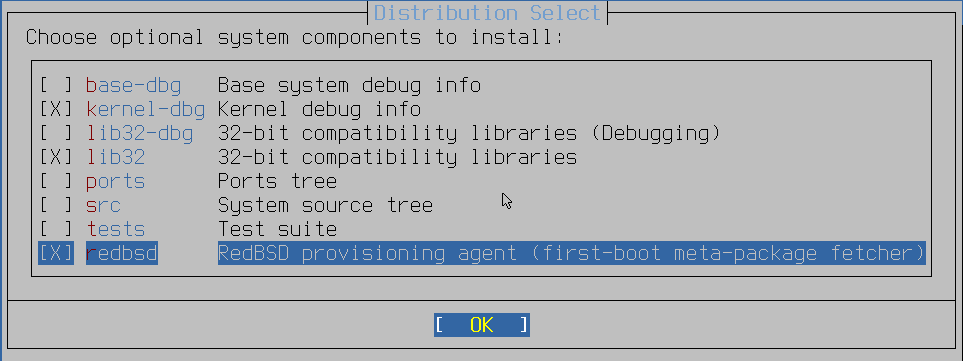
On the "Distribution Select" screen, make sure
redbsd (RedBSD provisioning agent) stays checked, in addition to
any other components you want.
Note (VMware): if your VM has 3D acceleration enabled with a large video memory allocation (e.g. 8GB), the FreeBSD installer can hang during boot. Install with 3D acceleration disabled, complete the install and first boot, then enable 3D acceleration and increase video memory afterward.
First Boot
After installation completes and the system reboots, you'll be greeted by the SDDM login screen. Log in with the user account created during installation to load the XFCE-derived desktop with the full RedBSD toolset available from the application menu.
To check your installed version at any time, open a terminal and run:
redbsd-version
cat /etc/redbsd-release
For SSH access during a pentest engagement, remember that RedBSD does not enable
password-based root SSH login by default — configure /etc/ssh/sshd_config
according to your lab's security requirements.